How Do I Enable Real-Time Backups?
The real-time updates feature is an additional add-on. To subscribe to it, please write to us at support@blogvault.net and we will further assist you in subscribing to the add-on. Once the add-on is purchased, you can follow the steps below to enable or disable the feature from the dashboard.
Step 1 of 3
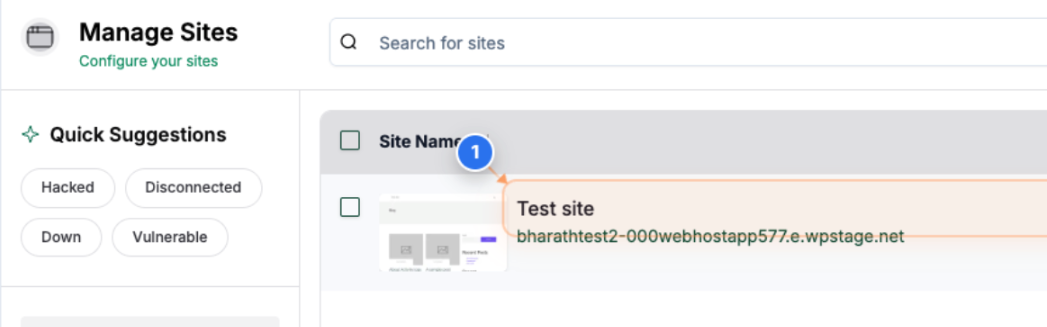
Open Site Dashboard
Click on your site name in the Sites page to open its dashboard and view management options.
Note: You can use this section to access detailed tools such as backups, security scans, and performance insights for the selected site.
Step 2 of 3
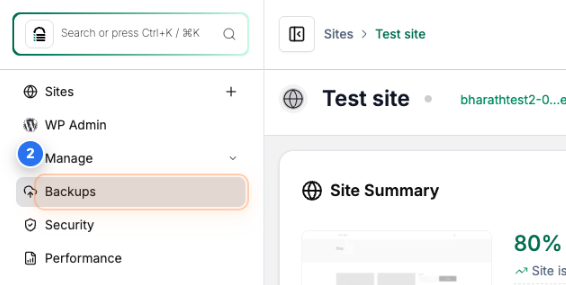
Access Backup Section
Click on the Backups option in the left sidebar to open the backup management section for the selected site.
Note: This section provides details about your recent backups, schedule, and real-time backup settings.
Step 3 of 3
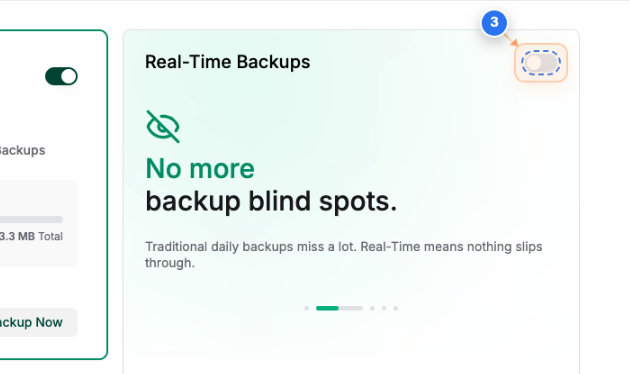
Enable Real-Time Backups
Click the toggle switch in the Real-Time Backups section to turn on Real-Time backup protection for your site.
Note: When enabled, all site changes are instantly backed up without waiting for the next scheduled backup.